Introduction
DidI is a smart lifelogging app that maps your day and turns movements, places, and app use into a readable timeline. DidI quietly analyzes background movement, location and app activity to reconstruct your daily flow and offers nightly AI summaries highlighting patterns and moments. DidI is built for people who want effortless reflection while keeping data private, whether you need a simple recap of the day or a way to spot long-term habits.
Key features
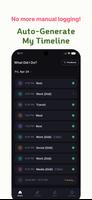
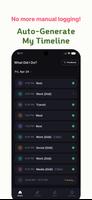
The automatic timeline captures inferred activities such as commuting, working, studying, walking, or visiting a cafe without requiring manual entry; entries are linked to locations, time spans, and the apps you used during those periods. Nightly AI summaries synthesize the day into digestible highlights and observations so you can review trends instead of sifting through raw logs. A context-aware diary lets you attach feelings, short notes, or voice memos to timeline entries so journaling becomes fast and habit-friendly. DidI also offers search and filter tools that make it easy to find specific days, places, or activity types and to tag moments for later review.
How it works
DidI runs in the background using motion sensors, location signals, and app-usage data to infer what you did and when. The app prioritizes on-device inference to minimize data transmitted off the device; when you opt into cloud backup the data is encrypted before leaving your phone. Timeline accuracy improves over time as you make corrections and add context, a simple progression system where your inputs help the model learn your routines. Manual edits are fast: tap an entry to correct labels, adjust times, or merge adjacent events, and DidI will use those corrections to refine future guesses.
Controls and customization
Navigation is designed to be intuitive: swipe and pinch to move between day, week, and month views, tap a timeline event for details, or long-press to add a note or favorite a moment. Visual themes allow you to choose a lighter or darker interface and to adjust font size for easier reading. You can create custom categories and tags, set activity sensitivity to favor battery life or higher fidelity, and configure nightly summary tone—from reflective companion to analytical reviewer. Sharing is done through standard Android intents so you can export a moment or summary to other apps, or create local backups for personal archives.
Privacy and storage
Privacy is a core design point: DidI processes most sensitive signals locally and limits any network transfers to user-approved, encrypted backups. When cloud backup is enabled those backups use AES-256 encryption so stored copies remain protected. Permission prompts are explicit and explain why each sensor or access is requested; you can selectively disable location or activity tracking if you prefer lighter data collection. Temporary use of data for AI summaries is transparent in the settings panel, and you can delete individual events or purge all stored history at any time.
Accessibility and offline use
DidI supports adjustable text sizes, high-contrast themes, and screen-reader friendly labels to help users with different accessibility needs navigate their timelines. The core inference continues to operate offline using device sensors so you can maintain a usable timeline without a persistent internet connection; certain features such as cloud backup or server-based enhancements require connectivity but basic recording and daily summaries work locally. Battery-conscious modes reduce sensor polling and rely more on coarse location changes to preserve uptime on longer trips.
Limitations and practical tips
Automatic inference is powerful but not perfect: DidI may occasionally mislabel an activity or generate a summary that feels generalized. Enabling the recommended sensors and allowing activity access will improve results, and quick manual corrections signal the app to adapt to your routine. For the most useful summaries, allow background processing overnight so the nightly digest can assemble the full day. DidI is designed for personal reflection and habit awareness and should not be used as an authoritative medical or legal log.
Long-term value and replayability
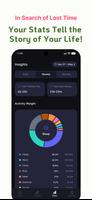
Over weeks and months DidI becomes more useful as patterns emerge and your notes build a meaningful personal archive. The searchable timeline and tagging system let you rediscover forgotten trips, repeated behaviors, and changes in routine, turning passive background data into actionable insight. Regular use rewards users with clearer habit awareness and a lightweight journaling habit that is easy to maintain: review nightly, correct when needed, and let DidI help you remember what mattered.
File size: 47.06 M Latest Version: 1.6.1
Requirements: Android Language: English
Votes: 229 Package ID: com.whatdidi.whatdidi
Developer: franholdings
Screenshots





Explore More

Discover and download the latest system software of 2024 at high speed for free. Explore multidimensional rankings and references to help you choose the best system software. Rest assured, all software has undergone rigorous security checks and virus scans for your safety.























-
2
PS2X Emulator Ultimate PS2
-
3
Controls Android 14 Style
-
4
Slotomania
-
5
Jackpot Friends Slots Casino
-
6
Klompencapir Game Kuis Trivia
-
7
Know-it-all - A Guessing Game
-
8
A Growing Adventure: The Expanding Alchemist
-
9
Justice and Tribulation
-
10
Toothpick