Introduction
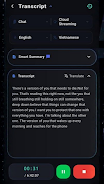
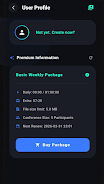
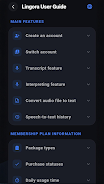
lingora is an AI-powered real-time speech assistant that converts spoken conversations into live transcripts, translations, smart summaries, and interview insights so you can follow meetings, practice languages, or prepare for interviews without manual note-taking. From one-tap recording to continuous streaming while you speak, lingora captures audio, displays live speech-to-text, and offers on-demand translations and concise summaries, helping you stay present in conversation while preserving searchable notes for later review.
How it works
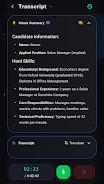
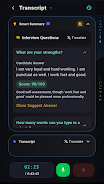
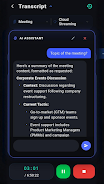
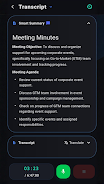
The app streams audio in real time and processes speech incrementally to produce an immediate transcript and translation as words are spoken. Processing is designed to keep pace with natural conversation so the transcript appears progressively rather than all at once. When a session ends you can generate an AI summary that highlights key points and suggested follow-up questions; these outputs are structured to be easy to scan and export for meeting minutes or study notes.
User controls and interaction
lingora provides simple, touch-friendly controls to start, pause, or stop streaming and to highlight moments during a conversation that you want the system to mark as important. The interface supports speaker labeling and manual correction of transcribed text so you can refine the output. Basic playback controls let you jump to timestamps, replay specific segments, and listen alongside the transcript for verification or practice.
Modes and progression
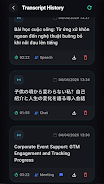
Rather than levels, lingora organizes activity into modes such as Meeting Mode, Language Practice Mode, and Interview Mode, each tuned with settings for vocabulary sensitivity and summary style. A session history tracks your past transcripts and summaries so you can see how your comprehension or language ability progresses over time. Users building a study routine can review past sessions, compare performance, and set goals for vocabulary or pronunciation improvement.
Customization and visual style
The app offers customization of language pairs for translation, transcript formatting, and display preferences including font size and theme options to match lighting conditions. Visual cues such as highlighted keywords and color-coded speaker labels make long transcripts easier to scan. These choices let you adapt lingora’s presentation to business meetings, casual conversations, or focused language practice.
Review, replay value and saved content
Saved conversations and summaries add replay value by turning each session into reusable study material or reference documents. You can revisit highlights, export transcripts to text files, or copy suggested follow-up questions into your notes. This ability to review and repurpose captured speech makes the app useful beyond the initial conversation, whether you are preparing for an interview or revisiting a complex discussion.
Accessibility and offline access
Accessibility features include adjustable text size, clear visual contrast, and the ability to read transcripts aloud for users who prefer audio review. While live streaming requires an active connection for full real-time processing, previously saved transcripts and summaries are available offline for reading and playback, allowing you to access past sessions without network access.
Limitations and accuracy
Transcription and translation results depend on audio quality, background noise, and accent variation; occasional errors are expected and manual corrections are supported. AI-generated summaries and suggested questions are intended to assist with comprehension and preparation but should not replace careful review or professional judgement in sensitive situations.
Who benefits
lingora is designed for professionals, students, language learners, and anyone who needs to capture spoken information without interrupting the natural flow of dialogue. It supports a variety of everyday scenarios from taking meeting minutes to practicing conversational skills and preparing for interviews, helping users convert talk into structured, actionable information with minimal friction.
File size: 71.61 M Latest Version: 1.0.0
Requirements: Android Language: English
Votes: 441 Package ID: com.enterjoy.lingora
Developer: enterjoy
Screenshots

Explore More
Discover and download the latest system software of 2024 at high speed for free. Explore multidimensional rankings and references to help you choose the best system software. Rest assured, all software has undergone rigorous security checks and virus scans for your safety.

















Popular Apps





-
2
PS2X Emulator Ultimate PS2
-
3
Controls Android 14 Style
-
4
Slotomania
-
5
Jackpot Friends Slots Casino
-
6
Klompencapir Game Kuis Trivia
-
7
Know-it-all - A Guessing Game
-
8
A Growing Adventure: The Expanding Alchemist
-
9
Justice and Tribulation
-
10
Toothpick