Introduction
SafeOS is a compact password manager designed to securely store and organize your website, app, and email credentials inside an encrypted vault. From first launch you can set a PIN or enable biometric unlock (fingerprint or face) so the app stays convenient without sacrificing privacy. SafeOS focuses on straightforward account management: quick search, category-based organization, and auto-lock behavior help you stop reusing weak passwords and make day-to-day access faster and safer.
Key Features
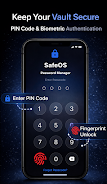
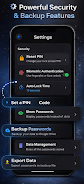
The core of SafeOS is an encrypted vault that keeps all credentials locally protected until you unlock them with your chosen method. The app supports PIN and biometric authentication for rapid unlocking, and it automatically locks after a configurable period of inactivity so sensitive information is not exposed on a lost or idle device.
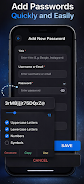
SafeOS includes an integrated password generator that can create strong, random passwords with options for uppercase, lowercase, numbers, and symbols. Generated passwords can be copied or saved directly into an entry, and entries can store usernames, notes, and custom fields so each login record contains the details you need.
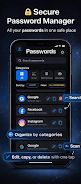
Organization is handled through a simple category system with search and filter tools that make it easy to find a saved credential in seconds. Rather than forcing a complex hierarchy, SafeOS uses tags and categories to let you group logins by account type, personal vs. work, or any system you prefer. The interface supports both list and compact views and a modern dark-mode theme for comfortable use in low light.
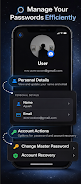
To assist with device changes, SafeOS offers encrypted cloud backup and restore. Backups are encrypted before leaving your device and can be stored in your preferred cloud account; restore is designed to bring your vault onto a new device while preserving encryption. For manual workflows, the app also provides import and export support for standard file formats so you can move data between tools when necessary.
Advantages
SafeOS blends strong encryption with biometric convenience so unlocking feels natural while credentials remain protected. The combination of quick search, categories, and a generator reduces password reuse by making unique credentials easy to create and retrieve. Because the primary vault lives locally, you can access stored items offline; cloud backup is optional and used only for migration or extra redundancy.
The app’s dark-mode interface and simple layout keep daily password tasks efficient. Whether you are adding a new account, editing an existing entry, or switching devices, SafeOS keeps the steps minimal and preserves the security settings you choose. Backup and restore flows are documented inside the app so transferring to a new phone is straightforward even for non-technical users.
Disadvantages
Using encrypted cloud backup requires linking your cloud storage account, which introduces an external dependency you must manage. If you prefer never to use cloud services, you can rely on local-only storage and manual export, but that requires careful handling of backup files.
Biometric unlock depends on your device hardware and operating system settings; on older devices you may need to rely solely on a PIN. Similarly, import and export operations may require attention to file formats and manual steps, so those processes are not fully automatic in every scenario.
How the App Feels and Controls
Navigating SafeOS is handled through a straightforward tab and list structure; primary actions like add, edit, search, and backup are reachable from the main vault screen without deep menus. Creating a new credential prompts for standard fields and optional notes, and saving is immediate. The search box filters results as you type, and category filters narrow lists quickly on larger vaults.
Accessibility, Offline Use, and Reliability
SafeOS is designed to function offline for regular access to stored items; only backup and restore require network access. The interface supports high-contrast elements and scalable fonts to help users who need larger text, and touch targets are sized for comfortable one-handed use. Synchronization is not required for basic operation, so you can maintain a fully local, encrypted vault if you prefer.
Security Tips and Best Practices
To get the most from SafeOS, enable biometric unlock if your device supports it, use the built-in generator to replace reused passwords, and keep an encrypted backup in a cloud account you control for recovery. Configure auto-lock to a short timeout if you often work in public places, and protect your device lock screen with a strong passcode to add an extra layer of defense.
File size: 22.35 M Latest Version: 1.7.4
Requirements: Android Language: English
Votes: 116 Package ID: com.safeos.passwordmanager
Developer: DevAyush
Screenshots

Explore More

Discover and download the latest system software of 2024 at high speed for free. Explore multidimensional rankings and references to help you choose the best system software. Rest assured, all software has undergone rigorous security checks and virus scans for your safety.






Popular Apps





-
2
PS2X Emulator Ultimate PS2
-
3
Controls Android 14 Style
-
4
Slotomania
-
5
Jackpot Friends Slots Casino
-
6
Klompencapir Game Kuis Trivia
-
7
Know-it-all - A Guessing Game
-
8
A Growing Adventure: The Expanding Alchemist
-
9
Justice and Tribulation
-
10
Toothpick