Introduction
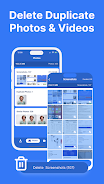
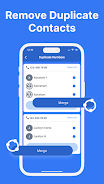
Phone Cleaner is a lightweight utility that reclaims storage and keeps your device organized. Phone Cleaner scans for duplicate photos and videos, identifies temporary and junk files, and helps merge duplicate contacts to reduce clutter while giving you clear control over what is removed.
What this app does
The app inspects your device storage to locate redundant media and unnecessary cache files, grouping likely duplicates and obsolete items so you can review them. It analyzes file metadata and visual similarities for media files, flags temporary files that applications commonly leave behind, and detects repeated contact entries by name, phone number or email to suggest merges. A built-in VPN option provides basic encrypted connectivity when you use public Wi‑Fi networks, offering an extra privacy layer for everyday browsing.
User controls and workflow
Phone Cleaner is designed around a short three-step workflow: scan, review, and clean. Start a scan with a single tap, review the grouped results presented with thumbnails and file details, and confirm cleanup actions. The interface emphasizes clear previews and confirmation prompts before any deletion, so you always know what will be removed. Controls are simple: primary actions are large, labels are explicit, and common operations can be completed without deep menus or technical knowledge.
Scan behavior and progression
During a scan you see an on-screen progress indicator and a breakdown of found items by category so you understand where space is being used. Results are sorted to help you prioritize the largest gains first, with duplicates and bulky cache files shown prominently. After cleanup, the app reports the total storage reclaimed and a summary of removed items so you can track improvements over time.
Customization and safety options
Phone Cleaner lets you tailor the review process to match your preferences: you can inspect individual files, exclude folders or contact groups from scans, and adjust which categories are included in a pass. The app emphasizes safe cleanup with detailed previews and explicit confirmation steps; if you prefer to be cautious, simply skip items you want to keep. Required access to storage and contacts is explained in-app so you understand why permissions are requested and how they are used.
Visual design and accessibility
The visual style favors clarity and minimalism: readable type, consistent icons, and straightforward color contrasts make it easy to find functions and interpret results. Thumbnails and file metadata are displayed at sizes that aid quick decisions. The interface supports accessibility norms such as clear labels, focusable elements for screen readers, and scalable text to help users who need larger fonts or simplified layouts.
Offline functionality and network use
Most cleanup functions operate entirely on the device without requiring a network connection, allowing you to manage storage while offline. The optional VPN feature requires internet access and is separate from the file scanning and cleaning operations; it is provided to help protect your browsing data on unsecured networks and does not impact local cleanup tasks.
Maintenance, replay value, and tips
Regular use of Phone Cleaner helps keep storage optimized: running periodic scans uncovers newly accumulated cache or duplicate media and maintains a tidy contact list as you add new entries. The app provides guidance on common space drains and practical tips for photo management, making it easy to form good maintenance habits rather than relying on one-off cleanups.
Limitations and permissions
To perform thorough cleaning and contact merging, Phone Cleaner requires access to device storage and contacts. The built-in VPN offers basic privacy protections for browsing on public networks but is not intended to replace full-featured security suites. The app focuses on safe, user-approved cleanup steps rather than automatic irreversible changes.
Who should use it
Phone Cleaner is well suited for users who want a straightforward tool to free up space, organize media libraries, and remove obvious junk without complicated settings. Its clear review process and simple controls make it appropriate for people who prefer hands-on confirmation before deletions and for those who appreciate an integrated, no-frills VPN option when connecting to public Wi‑Fi.
File size: 11.36 M Latest Version: 1.1.1
Requirements: Android Language: English
Votes: 147 Package ID: mobi.cleaner.phone
Screenshots



Explore More
Explore the Latest Free Downloads of Top Photo Apps in 2024, Featuring Multi-Dimensional App Rankings and Recommendations for the Best Photo Applications. All apps are virus-free, safe and secure for your peace of mind.


















Popular Apps





-
2
PS2X Emulator Ultimate PS2
-
3
Controls Android 14 Style
-
4
Slotomania
-
5
Jackpot Friends Slots Casino
-
6
Klompencapir Game Kuis Trivia
-
7
Know-it-all - A Guessing Game
-
8
A Growing Adventure: The Expanding Alchemist
-
9
Justice and Tribulation
-
10
Toothpick